A Google search for AI note takers yields hundreds of results. Most are thin interfaces wrapped around the same underlying models. They promise the same thing: “We record your meetings so you don’t have to.”
To find the right AI note taker, you should look at how that particular AI app integrates with your workflow and what features are the most valuable to you. I’m here to help you make that choice with boosted confidence.
My Curated Picks: The Best AI Note Takers In 2026
In 2026, transcription is a commodity. Every tool on this list achieves a baseline accuracy of 90% or higher, effectively making “getting the words right” the entry fee. So, in compiling this list of worthy AI note takers, I looked at value beyond the recording capabilities.
This mindset is the very foundation on which Himala has built its own comprehensive AI meeting agent. A capable AI note taker is but a part of the broader meeting ecosystem and its role in the business as a whole.
That said, here are the best AI note takers in 2026; they are not listed in any specific order, as they each offer unique features and specialized use cases.
The Best AI Note Takers in 2026
Himala
Best for teams and/or individuals who want meeting notes to sit inside a broader workflow of prep, context, and follow-through to maximize meeting value.
Fireflies.ai
Best for sales organizations that want meeting notes to feed directly into CRM fields and analytics.
Otter.ai
Best for participants who want a live, collaborative transcript during the meeting.
Tactiq
Best for those seeking a bot-free capture through the browser using live captions.
Granola
Best for those who prefer to stay engaged and write rough notes while AI turns them into polished summaries.
Google Gemini
Best for Google Workspace teams who want native Meet notes saved directly into Docs and Calendar.
Bluedot
Best for visual teams that rely on screen recording and video context.
Avoma
Best for customer-facing teams that need meeting notes tightly connected to revenue workflows and CRM.
Krisp
Best for professionals who work in uncontrolled environments like noisy coffee shops or home offices with kids.
Himala
Recording Method: Himala can either join meetings as a visible participant or capture meetings from the user side through its own app and integrations.
Language Support: English, Spanish, French, German, Italian, and Portuguese, with more supported languages on the way.
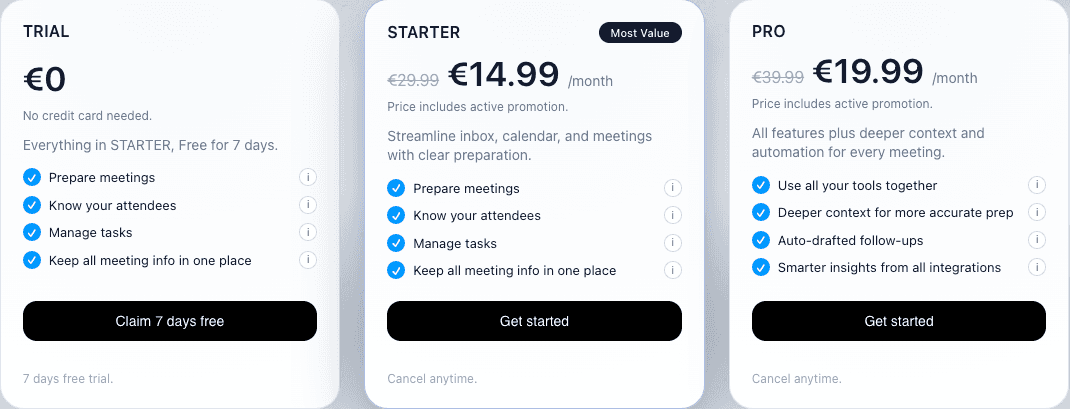
Price: Free/Trial (The full Starter Plan for 7 days) / Starter (€14.99/user/mo) / Pro (€19.99/user/mo).
What It Is and Why It’s Good: Himala is an AI-powered meeting assistant designed to automate the entire meeting workflow, from meeting preparation to follow-through, not just capture what’s said. It pulls context from your calendar, emails, files, and connected apps to research attendees—the unique Attendee Intel feature—and surface key talking points before the meeting starts.
Himala’s Meeting Notetaker sits as a core part of this ecosystem and does not stop at mere transcription, but turns the meeting conversation into usable notes with outlined key decisions, important details, and clear follow-ups. After each meeting, you get structured summaries and action items. By the next meeting, these notes serve as a fleeting memory, allowing Himala to reference the previous summary, surface the action, and improve.
Additionally, and more uniquely, Himala can detect when other note-taking apps are present in the meeting and use that as context. Instead of duplicating effort, it adapts its own notes and summaries based on what is already being captured.
But Be Warned: The more you put into Himala, the more you get out of Himala. Because Himala’s strengths lie in context-aware workflows, its notes and automations work best when you utilize the integrations; for instance, by connecting your calendar and communication tools.
Product Philosophy: Himala is designed around the idea that meetings succeed or fail based on the context you bring into them and the records you produce afterward. Rather than treating meetings as isolated events with static agendas, Himala treats them as part of a living workflow where every conversation feeds into ongoing work and decisions
Key Features:
Attendee Profiles: Automatically researches participants and creates enriched profiles with insights for icebreakers and context.
AI-Generated Agendas: Builds structured, goal-driven agendas tailored to the meeting type, objectives, and attendees, adjusting as details change.
Smart Intel Context Engine: Pulls relevant emails, files, links, and past interactions from connected tools like Gmail, Drive, Slack, and Notion to give you what matters most for each meeting.
Talking Points: Turns context and past interactions into tailored talking points so you know what to say and focus on.
Chrome Plugin: A companion extension keeps the assistant close at hand during meetings and in your browser.
Fireflies.ai
Recording Method: AI joins the meeting via calendar invite or dial-in.
Language Support: 60+ Languages. High accuracy for dialects.
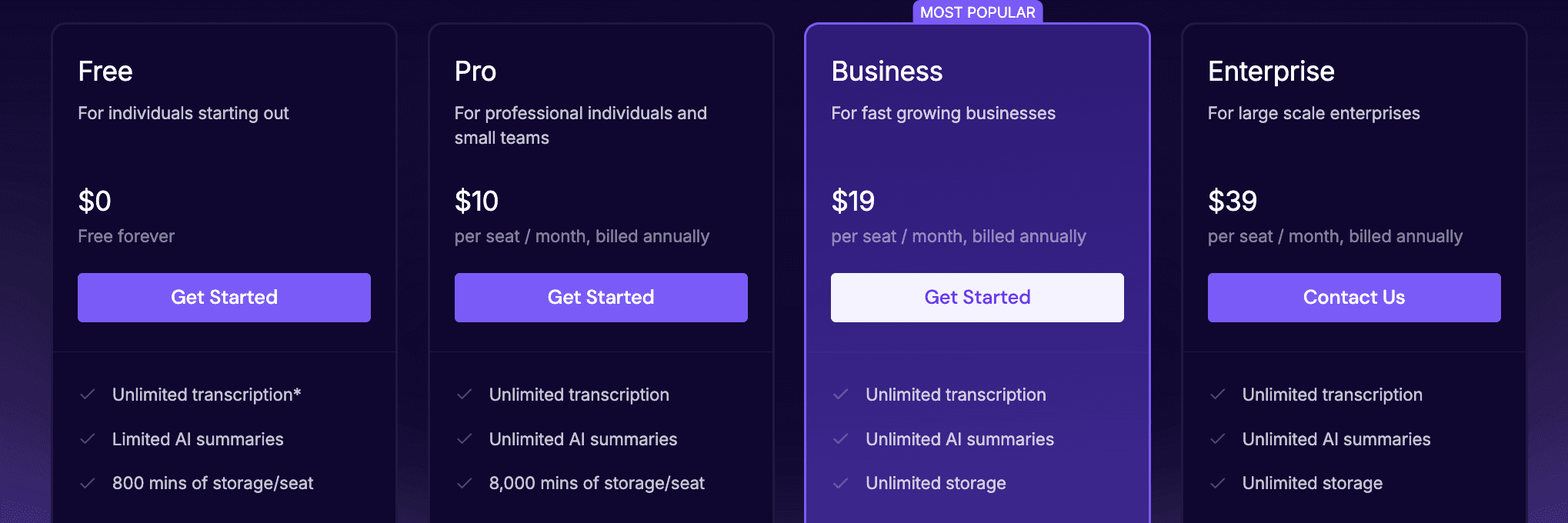
Price: Free (Unlimited transcription, lacking other key features) / Pro ($10/user/mo) / Business ($19/user/mo) / Enterprise ($39/user/mo).
What It Is and Why It’s Good: Fireflies is the current market leader for business intelligence. This AI note taker doesn’t just transcribe, but also analyzes, and this is what drives its value. The Fireflies note taker treats your meetings as a database by cleverly tracking “sentiments”; that is, the app counts how many times a competitor was mentioned, flags specific pricing objections, and measures speaker talk-to-listen ratios—that sort of useful stuff—and syncs that granular data directly into custom fields in Salesforce, HubSpot, Pipedrive, Zoho, and lots of other CRMs and AI sales tools.
The Fireflies AI note-taker integration depth is unmatched. If you need your notes to trigger a CRM workflow, this is the tool.
But Be Warned: The Fireflies AI note taker is loud; the bot joins every meeting, and the dashboard is dense.
Product Philosophy: Fireflies is primarily for the organization, not the individual user, compared to Himala, which fits both. While some other tools like Otter are designed to help you remember a conversation, Fireflies is designed to help you mine it. The Fireflies AI note taker operates on the belief that your meetings are a massive, untapped dataset, and its job is to structure that chaos into searchable, trackable metrics for your business dashboard.
Key Features:
AskFred: Chat with your meeting history.
Soundbites: Auto-creates shareable audio clips of key moments.
Sentiment Analysis: Visualizes trends in the conversation.
Topic Tracker: Alerts you whenever specific custom keywords are mentioned.
AI Super Summaries: Fully customizable summaries that you can tune with your own prompts.
Otter.ai
Recording Method: AI joins via calendar invite as a visible Otter Assistant participant.
Language Support: Primarily English (US/UK), with support for Spanish, French, and Japanese.
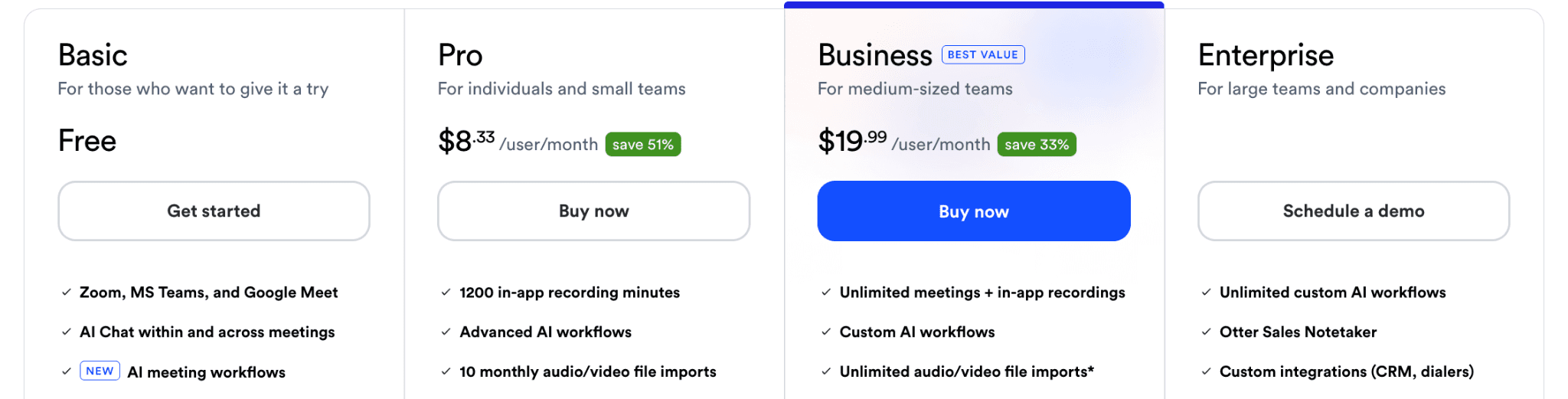
Price: Free (300 mins/user/mo) / Pro ($8.33/user/mo) / Business ($20/user/mo).
What It Is and Why It’s Good: Otter is a veteran in AI note-taking, having launched in 2018 before the AI boom when most competitors didn’t even exist. While many competitors have pivoted hard into revenue intelligence, such as Fireflies or Avoma, Otter has doubled down on accessibility and collaboration, staying true to its roots.
The Otter AI note taker superpower is the live, scrolling transcript that participants can read, highlight, and comment on in real-time. For example, if you join a meeting 15 minutes late, you can scroll up to read what you missed without interrupting the speaker to ask for a recap.
If you are a student trying to catch every word of a lecture, or a journalist needing to verify a quote instantly, this is your tool.
But Be Warned: The Otter AI note taker lacks the deep CRM custom field mapping of other note takers, and its video capabilities are limited. For instance, it cannot generate and share highlight clips of key moments from meetings and virtual presentations.
Product Philosophy: Otter builds for the participant, not the manager. While tools like Fireflies are designed to extract data from your calls for reports, Otter is designed to work with you during them. The Otter AI note taker treats meetings as a living, collaborative text document.
Key Features:
OtterPilot: The AI assistant that auto-joins meetings to record and share notes.
Otter AI Chat: Ask questions to the AI about the meeting as it’s happening.
Slide Capture: Automatically detects and inserts screenshots of shared slides into the notes.
Live Transcript: Watch the words appear in real-time.
Tactiq
Recording Method: Chrome extension that reads real-time closed captions; no bot ever joins the meeting.
Language Support: 40+ languages. Uses browser-based transcription for high multilingual accuracy.
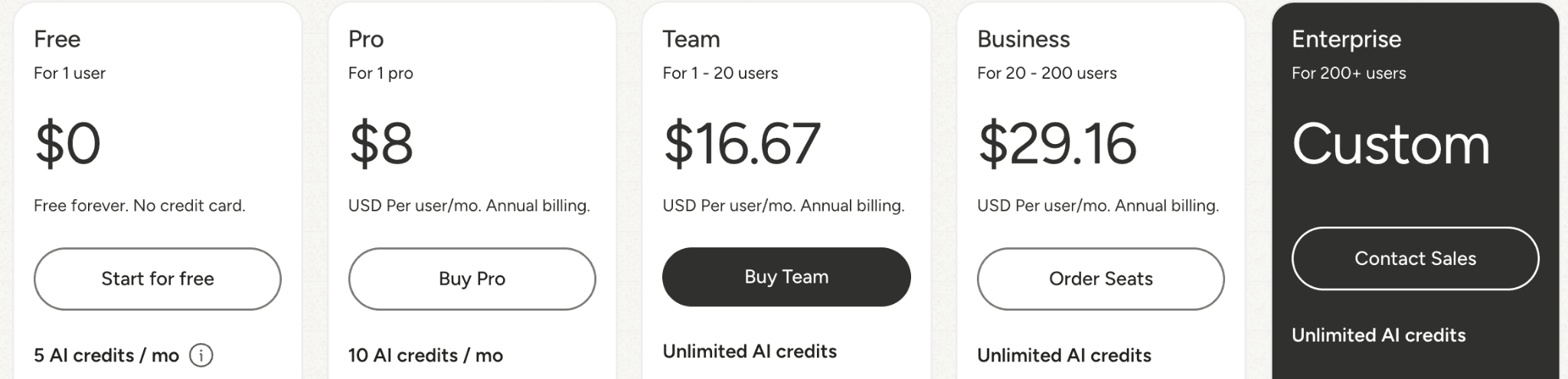
Price: Free (10 meetings/user/mo) / Pro ($8/user/mo) / Team ($16.67/user/mo) / Business ($29.16/user/mo).
What It Is and Why It’s Good: The Tactiq AI note taker operates on the principle of non-intrusive utility. Unlike its bot-based cousins, which enter the room with a recording avatar—such as Fireflies and Otter—Tactiq lives entirely in your browser as a Chrome extension.
Additionally, this note-taker AI reads the closed captions that are already being generated by Google Meet, Zoom, or Teams, and saves them into a transcript in the background. This approach yields higher accuracy than audio bots by bypassing internet lag, and lets you run custom AI prompts live in the sidebar.
This is the best AI note taker for those who, for one reason or another, value discretion.
But Be Warned: The trade-off for discretion is that you must keep the browser tab open and focused; if you close the window, the recording stops, but that is easy enough to manage. Tactiq also does not record audio or video. Because it only scrapes the text from the screen, you don’t get an audio file to listen back to later.
Product Philosophy: By leveraging the data stream that already exists, this AI app cleverly avoids the need for intrusive bots, keeping the meeting human-centric while still capturing the data.
Key Features:
Bot-Free Capture: Records via the browser.
Platform Versatility: Works on Zoom, Google Meet, Teams, and Webex via one extension.
Ask Tactiq: Ask questions of the transcript immediately after the call using ChatGPT.
Speaker Identification: Uses the caption data to correctly identify who said what with astonishing accuracy.
Granola
Recording Method: Native app that captures the device’s audio on Mac and Windows; there’s no AI bot joining the meeting.
Language Support: 10 Core Languages on desktop (English, French, German, Spanish, Italian, Portuguese, Dutch, Japanese, Russian, and Hindi). The iPhone app adds 7 more (Mandarin Chinese, Finnish, Korean, Polish, Turkish, Ukrainian, and Vietnamese).
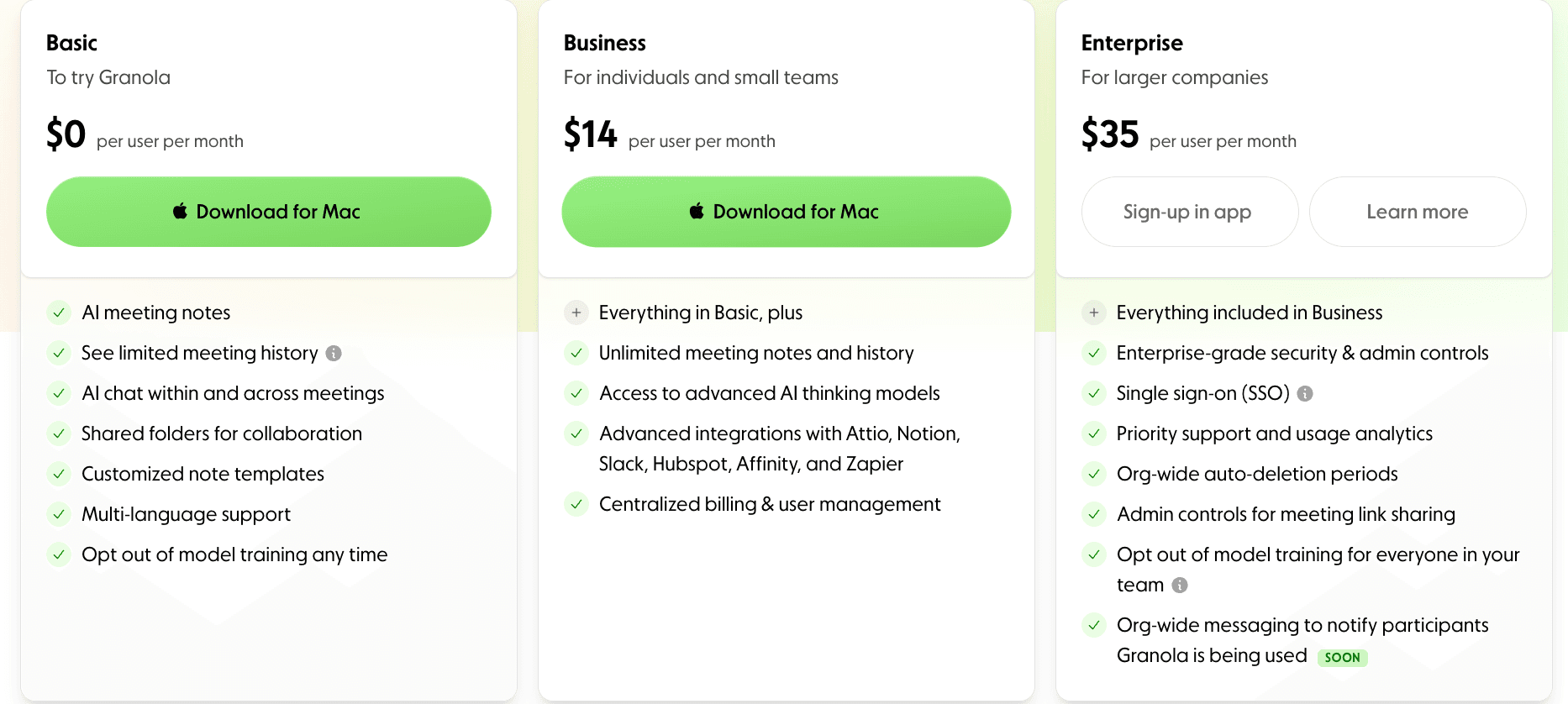
Price: Free (25 meetings/user/mo) / Pro ($10/user/mo) / Enterprise ($35/user/mo).
What It Is and Why It’s Good: Instead of a bot that generates a wall of text, Granola runs natively on your computer (Mac, and, as of mid-2025, Windows, too) and empowers you to write the notes. You jot down rough bullet points during the meeting, and the AI listens to the audio to flesh them out into perfectly formatted prose. For example, you can type “fix bug next week,” and Granola will expand and polish it.
This is the tool for people who want to stay engaged. Because the Granola AI note taker runs as a native app, it feels much faster than browser-based tools. This AI app also integrates deeply with your actual workflow: sending tickets directly to Linear, docs to Notion, or updates to Slack with a single click, and so on.
But Be Warned: Much like Tactiq, Granola makes a significant trade-off for its invisibility: it does not store audio or video. There is no play button to hear exactly how someone said something or to see a screen share you missed. Once the meeting is over, the text is the only record you have.
Product Philosophy: Granola builds for synthesis, not just transcription. While other tools try to automate the thinking process and hence make you passive, Granola tries to augment it, making you sharper.
Key Features:
Assisted Notes: You type the skeleton; AI adds the meat.
Native App: Runs locally on your Mac, capturing system audio without a bot.
Shareable Cards: Creates beautiful, design-forward summary images for Slack.
Template Library: Custom formats for “User Interviews” or “Design Critiques.”
Google Gemini
Recording Method: Native integration built into Google Meet; no AI bot required.
Language Support: 8 Core Languages: English, French, German, Italian, Japanese, Korean, Portuguese, and Spanish.
Price: ~$20/user/mo (Add-on for Workspace) or included in premium AI plans.
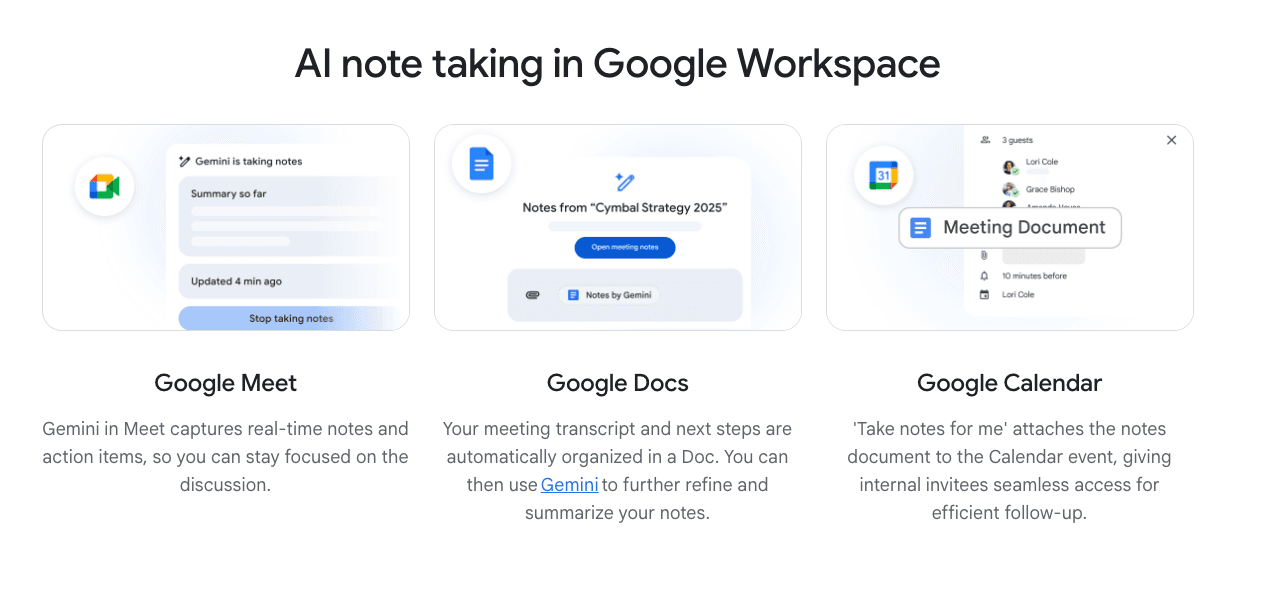
What It Is and Why It’s Good: Google Gemini is the ultimate no-install, hassle-free solution for teams already paying for Google Workspace. The Google Gemini AI note taker eliminates the friction of managing third-party apps by living natively inside the Google Meet sidebar. Its standout feature is the “Summary so far,” which allows latecomers to catch up on the discussion in real-time without interrupting the flow.
Once the meeting ends, Gemini automatically generates a structured Google Doc in the organizer’s Drive and attaches it to the original Calendar event, making it the most organized tool for purely internal workflows.
But Be Warned: Gemini is strictly ecosystem-locked. If your team occasionally hops onto Zoom or Microsoft Teams, Gemini cannot follow you; it only exists within Google Meet. Unlike Otter or Tactiq, it doesn’t provide a full, scrolling live transcript during the call but focuses on summaries and action items. Additionally, unless you also hit the separate “Record Meeting” button, Gemini will not save the audio or video file.
Product Philosophy: Gemini builds for domestic integration, not destination. While other tools try to pull you into their own dashboard to review notes, Gemini pushes the notes to where you already are (Google Docs/Drive).
Key Features:
Take Notes for Me: One-click activation inside Google Meet; no bot joins the call.
Summary So Far: If you join the meeting 10 minutes late, Gemini privately shows you a bulleted list of what you missed.
Docs Integration: Automatically saves the transcript and summary to a Google Doc attached to the Calendar event.
Action Items: Detects tasks and can sync them to Google Tasks (if configured).
Bluedot
Recording Method: Records via Chrome Extension or native desktop app without an AI bot ever joining the meeting.
Language Support: 100+ Languages. Optimized for technical demos and multi-language projects.
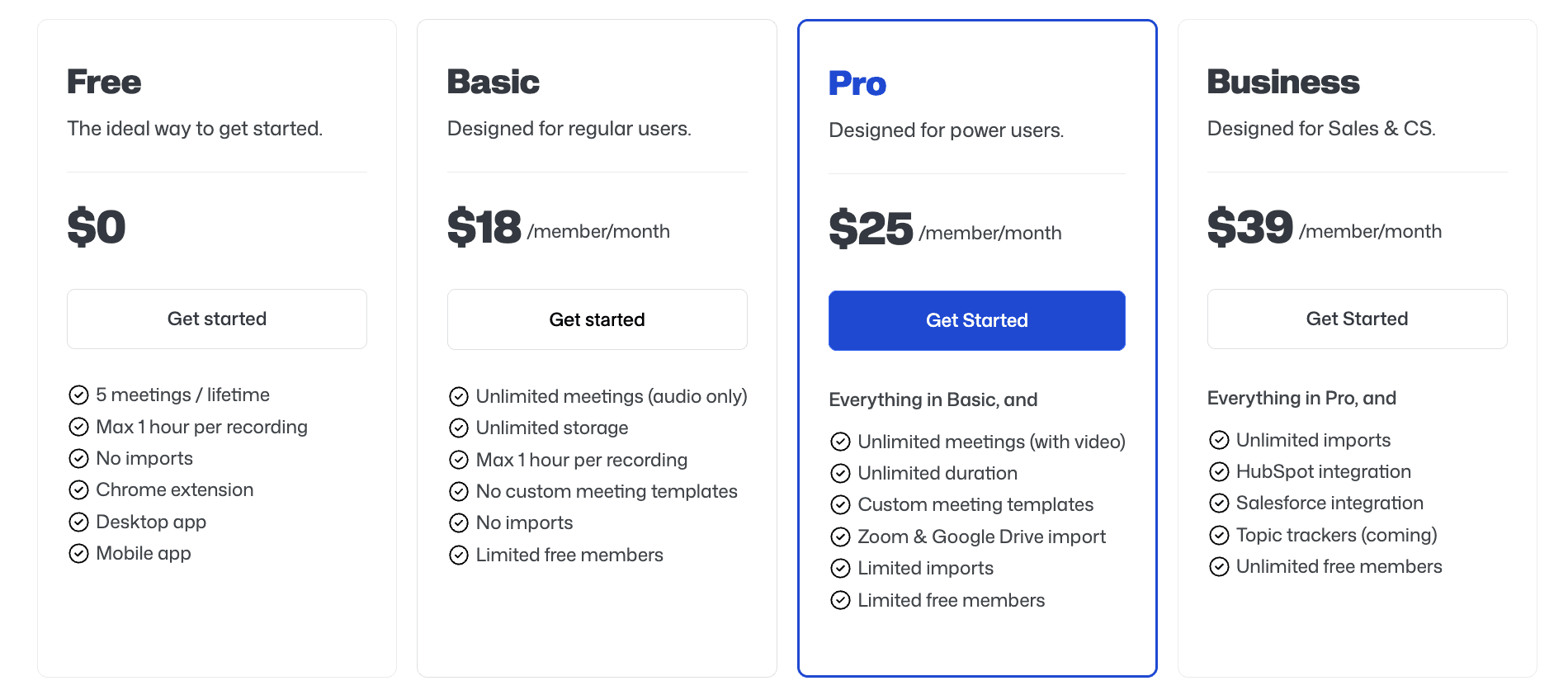
Price: Free (5 Lifetime Recordings) / Pro ($18/user/mo) / Pro ($25/user/mo) / Business ($39/user/mo).
What It Is and Why It’s Good: The Bluedot AI note taker operates in the same bot-free lane as Tactiq, but with one massive difference: it captures video.
While Tactiq just scrapes the text, Bluedot is a Chrome extension that records your screen and audio. This makes it the only stealth tool on the list capable of capturing a full product demo or a design review without a bot announcing it to your clients.
This is the tool for people who need visual context, not just words. If you are an engineer debugging a feature or a designer walking through a Figma file, a text transcript is useless. You need to see what was on the screen when the feedback was given.
But Be Warned: The trade-off is browser dependency; because the Bluedot AI note taker lives in Chrome, it cannot record a standalone app like the native Slack desktop app or a localized game engine; it only sees what is inside your browser tab.
Product Philosophy: Bluedot’s philosophy is actionable transparency. Bluedot believes that meetings should be recorded by default to build a knowledge-sharing culture, but that the recording process should never get in the way of the human connection.
Key Features:
Screen and Audio Capture: Records the visual presentation alongside the transcript without a participant bot.
Smart Highlights: Automatically detects and clips key moments (like a demo) into a shareable video link.
Timestamped Comments: Leave notes on specific frames of the video (e.g., “Fix this button color here”).
Collection Management: Organizes recordings into “Playlists” (e.g., “Onboarding Vids”) rather than just a chronological list.
Avoma

Recording Method: Avoma can record either by having an Avoma Assistant bot join meetings or by using bot-less native recordings (e.g., Zoom Cloud Recording, importing Teams recordings/transcripts).
Language Support: 70+ languages.
Price: Basic (Free 14-day trial) / Plus ($50/user/mo) / Premium ($90/user/mo)
What It Is and Why It’s Good: Avoma is less of a standalone AI note taker and more of a system for turning meetings into structured outputs: recordings, transcripts, AI-generated notes, and then pushing those outcomes into CRM and team workflows. In practice, the note-taking value comes from the fact that the notes are designed to be reused, shared internally, searched later, and logged against the customer/account context where teams actually work.
But Be Warned: Avoma’s cleanest no-bot setup often depends on your video platform’s native recording (for example, Zoom Cloud Recording), which itself requires the right licenses and admin setup. If you use the bot approach, it still has the usual bot constraints (needing to be allowed into the meeting, etc.)
Product Philosophy: Avoma treats meetings as operational data for customer-facing teams: capture everything, summarize it in consistent formats, and connect it to downstream actions. This AI note taker is the ingestion point, but the product is the workflow that comes after.
Key Features:
Audio and Video Recording Across Tools: Designed to record meetings across conferencing apps and dialers.
AI-Generated Notes That Sync to CRM: Notes are meant to reduce manual CRM updating and keep outcomes attached to the right records.
Bot-Based or Bot-Less Recording Options: Zoom Cloud Recording is explicitly supported as a bot-less path.
Conversation Intelligence Layer: Talk-time metrics, topic detection, searchable notes, and aggregated insights across meetings.
Krisp
Recording Method: Primarily bot-free. Krisp captures meetings by having you select Krisp Microphone + Krisp Speaker. You can optionally invite a Krisp Bot for bot-style capture and video recording.
Language Support: 16+ languages for transcription + summaries.
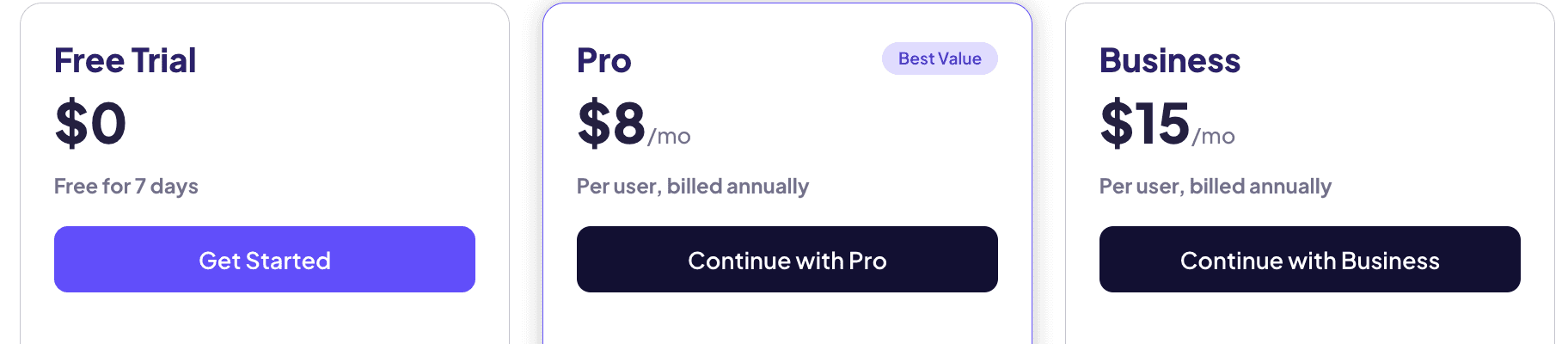
Price: Free trial (7 days) / Pro (from $8/user/mo billed annually; $16 billed monthly) / Business (from $15/user/mo billed annually; $30 billed monthly).
What It Is and Why It’s Good: Krisp started as an audio-quality tool (noise cancellation etc), and its AI note taker is built in the same audio layer philosophy: instead of needing a meeting bot, it can simply sit between your conferencing app and your mic/speakers, then produce a transcript plus summaries and action items. This makes it useful for teams who want meeting notes and better call clarity without changing how they meet.
But Be Warned: The note-taking workflow depends on routing audio correctly (picking Krisp as both mic and speaker). Also, Krisp’s recording feature is a paid-plan capability, and storage is not unlimited.
Product Philosophy: Krisp treats note-taking as a natural extension of clean audio in, clean output out. The focus is less on a separate meeting-bot persona and more on capturing what happened from the user’s device layer, optionally adding a bot only when you want that style of recording.
Key Features:
AI Summaries and Action Items: Generates structured notes from the transcript (decisions, actions, discussion points).
Noise Cancellation and Accent Conversion: The “signature” Krisp features, but integrated into the same meeting workflow.
Optional Krisp Bot for Bot-Style Recording: Available for Zoom/Meet/Teams when you want a visible assistant and improved video-recording handling.
Honorable Mentions
While the following tools are recognizable names in the space, they didn’t make my list for 2026; some because I haven’t tested them end-to-end, and others because they’re broadly similar to tools already on the list but, in my view, slightly less distinctive
Fathom: Sales-focused meeting notes and follow-ups, optimized for customer calls.
Fellow: Meeting management for teams with recurring meeting structures and action tracking.
Microsoft Teams (Built-in AI): Native Teams meeting summaries and internal documentation inside the Microsoft ecosystem, much like Gemini for the Google Workspace.
Scribe: Step-by-step process documentation from screen capture, built for SOPs and training.
Supernormal: Lightweight AI meeting notes with simple sharing and team access.
Turbo: Education-first note-taking for lectures, study workflows, and learning outputs.
Wave: Mobile-first recording and summaries for on-the-go meetings and interviews.
Jamie: Bot-free meeting notes from local recording, built for personal documentation and privacy.